Posts mit dem Label Android werden angezeigt. Alle Posts anzeigen

Mittwoch, 11. April 2012

Crossing the 50 billion km mark and giving Google Maps for Android a fresh look

type="html">Every day, millions of people turn to Google Maps for Android for free, voice-guided GPS navigation to guide them to their destination. So far, Navigation on Google Maps for Android has provided 50 billion kilometers of turn-by-turn directions, the equivalent of 130,000 trips to the moon, 334 trips to the sun, 10 trips to Neptune or 0.005 light years! When getting to your destination matters most, Google Maps for Android will get you there:


A new look for Navigation on Android 4.0+ phones
In today’s release of Google Maps 6.5 for Android we’ve redesigned the Navigation home screen in Android 4.0+ to make it easier to enter a new destination or select from recent and favorite locations by swiping left or right.


Left: New Navigation home screen   Right: Navigation in Google Maps for Android


Crisper, faster maps for high pixel density devices
If your device has a high pixel density screen, such as those on Galaxy Nexus, Galaxy S II, Droid Razr and others, you’ll now get higher resolution map tiles that take better advantage of the pixels-per-inch on your screen. The result is a crisper, less cluttered map that is easier to read:


Left: Previous style Right:New style in Google Maps 6.5 for Android


Compare our new map on the right to the previous map on the left. The road network is easier to see, less obstructed by labels, and has more color contrast. At more zoomed-in levels, you’ll notice a more controlled amount of maps labels to avoid cluttering the map and blocking out street names. The new style also helps maps react faster to panning, zooming and twisting.

You'll start seeing the new style as you navigate around new areas on the map; however, you can see these changes immediately by clearing your cache from the Maps settings.

Pick your preferred public transit mode and route option
Google Maps 6.5 for Android now lets you choose to prioritize a particular transit mode (such as the bus or subway) and route option (like taking the recommended route, one with fewer transfers or one with less walking). Whether you just need to get somewhere as fast as possible, or you want to avoid the risk of a missed connection or you prefer not to tire your legs, you can get the transit directions that best suit you. Transit directions and schedules are available for 475 cities around the world.


To start using Google Maps 6.5 for Android, download the update from Google Play. Learn more about how to use other great features of Google Maps for Android on the redesigned Google Maps YouTube channel that has 12 new videos available today.


(Cross-posted on the Lat Long blog)

Freitag, 24. Februar 2012

Collaborate and edit anywhere with the updated Google Docs for Android

type="html">As I was sitting on the ferry commuting to Google’s Sydney office this morning, two thoughts occurred to me. First, Australia is beautiful. If you’ve never been here, you really should visit. And second, it’s amazing how productive I can be with just my Android phone and an Internet connection. I was responding to email, reading news articles and editing documents—just like I do at the office. Only the view was better!

We want to give everyone the chance to be productive no matter where they are, so today we’re releasing a new update to the Google Docs app for Android. We've brought the collaborative experience from Google Docs on the desktop to your Android device. You'll see updates in real time as others type on their computers, tablets and phones, and you can just tap the document to join in.

We also updated the interface to make it easier to work with your documents on the go. For example, you can pinch to zoom and focus on a specific paragraph or see the whole document at a glance. We also added rich text formatting so you can do things like create a quick bullet list, add color to your documents, or just bold something important. Watch the new Google Docs app in action:


If you want to hear about the latest Docs news or send us feedback on the new app, visit Google Docs on Google+.

Gotta run—I’ve got another ferry to catch!

Samstag, 11. Februar 2012

Introducing Chrome for Android

type="html">In 2008, we launched Google Chrome to help make the web better. We’re excited that millions of people around the world use Chrome as their primary browser and we want to keep improving that experience. Today, we're introducing Chrome for Android Beta, which brings many of the things you’ve come to love about Chrome to your Android 4.0 Ice Cream Sandwich phone or tablet. Like the desktop version, Chrome for Android Beta is focused on speed and simplicity, but it also features seamless sign-in and sync so you can take your personalized web browsing experience with you wherever you go, across devices.


Speed
With Chrome for Android, you can search, navigate and browse fast—Chrome fast. You can scroll through web pages as quickly as you can flick your finger. When searching, your top search results are loaded in the background as you type so pages appear instantly. And of course, both search and navigation can all be done quickly from the Chrome omnibox.

Simplicity
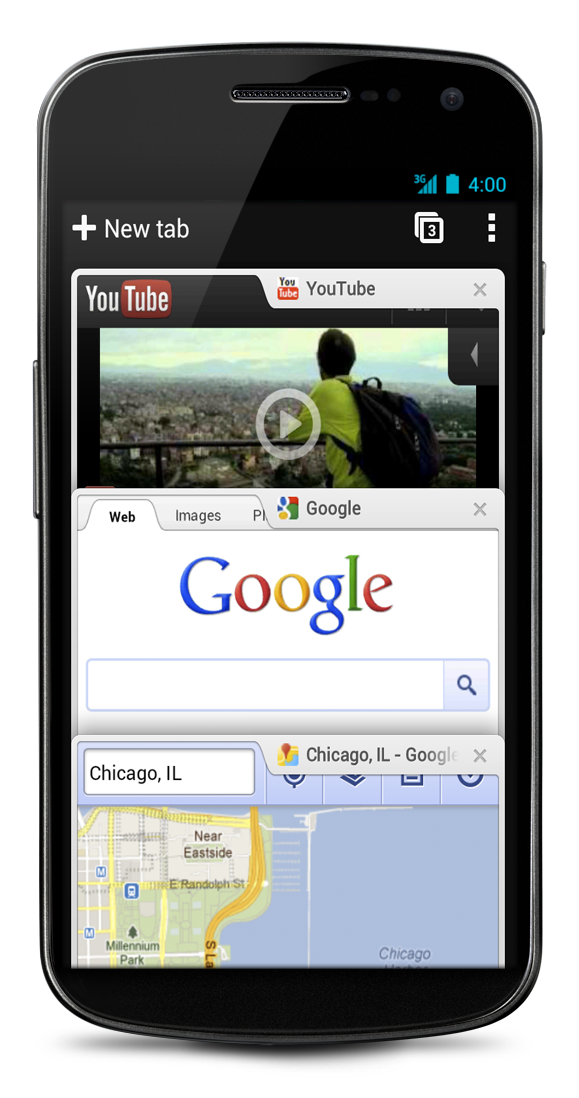
Chrome for Android is designed from the ground up for mobile devices. We reimagined tabs so they fit just as naturally on a small-screen phone as they do on a larger screen tablet. You can flip or swipe between an unlimited number of tabs using intuitive gestures, as if you’re holding a deck of cards in the palm of your hands, each one a new window to the web.


One of the biggest pains of mobile browsing is selecting the correct link out of several on a small-screen device. Link Preview does away with hunting and pecking for links on a web page by automatically zooming in on links to make selecting the precise one easier.

And as with Chrome on desktop, we built Chrome for Android with privacy in mind from the beginning, including incognito mode for private browsing and fine-grained privacy options (tap menu icon, ‘Settings,’ and then ‘Privacy’).

Sign in
You can now bring your personalized Chrome experience with you to your Android phone or tablet. If you sign in to Chrome on your Android device, you can:
  • View open tabs: Access the tabs you left open on your computer (also signed into Chrome)—picking up exactly where you left off.
  • Get smarter suggestions: If you visit a site often on your computer, you'll also get an autocomplete suggestion for it on your mobile device, so you can spend less time typing.
  • Sync bookmarks: Conveniently access your favorite sites no matter where you are or which device you’re using.


Chrome is now available in Beta from Android Market, in select countries and languages for phones and tablets with Android 4.0, Ice Cream Sandwich. We’re eager to hear your feedback. Finally, we look forward to working closely with the developer community to create a better web on a platform that defines mobile.


(Cross-posted from the Chrome blog and on the Mobile blog)